Description:
I’m experiencing an issue with displaying Japanese text in 8th Wall Studio’s UI Text entity.
Despite uploading a working Japanese TTF font and successfully converting it to .font8, Japanese characters are displayed as [] [] [] [] boxes instead of the actual text.
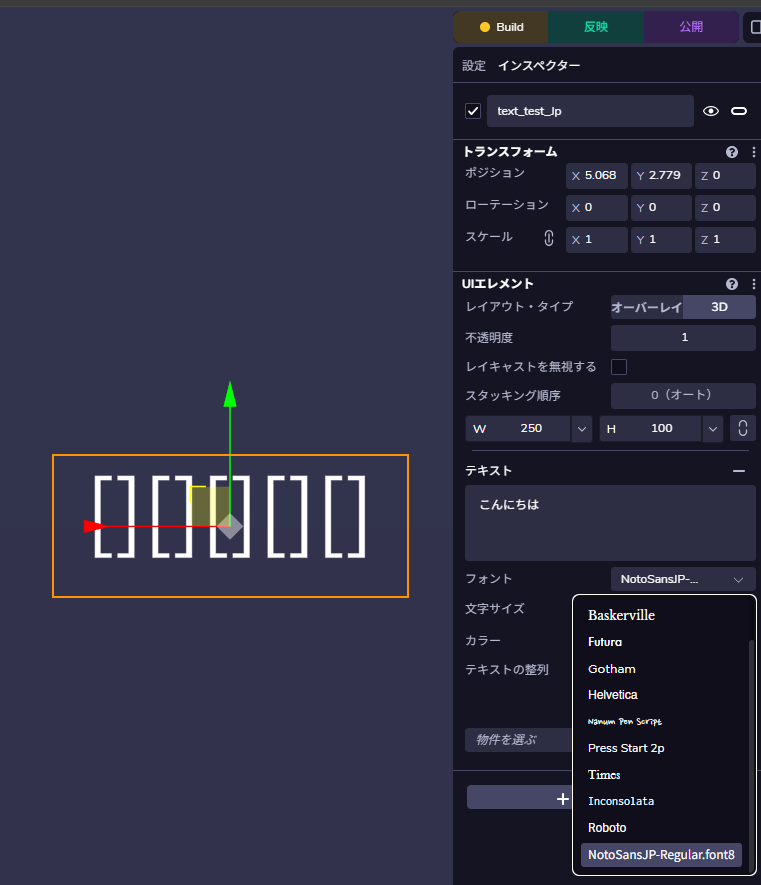
What I’ve tried:
-
Font verification: The original TTF file (Noto Sans JP) displays Japanese text correctly in Windows Font Preview, showing hiragana, katakana, and kanji properly.
-
Successful conversion: The TTF file was successfully uploaded to 8th Wall Studio and automatically converted to .font8 format.
-
Font configuration: In the UI Element component, I have:
- Selected the converted Japanese font from the dropdown
- Set appropriate font size (48-60px)
- Set sufficient width (400-500px)
- Input Japanese text:
こんにちは、世界!
-
Debugging results: I created a troubleshooting component that revealed:
 Default font works with Japanese text (in console logs)
- Custom font works with English text
- Custom font “appears” to work with Japanese text (console shows success)
 But viewport still shows
 [] [] [] []boxes
The core issue:
While the console logs indicate that Japanese text is being set successfully (cursor.text = 'こんにちは世界'), the actual rendering in the viewport displays placeholder boxes instead of Japanese characters.
Questions:
- Is there a known limitation with Japanese/CJK character rendering in UI Text entities?
- Are there specific font format requirements for Japanese fonts beyond TTF→.font8 conversion?
- Are there alternative approaches for displaying Japanese text in 8th Wall Studio projects?
- Could this be related to the font subset during conversion process?
Environment:
- 8th Wall Studio (latest version)
- Browser: Chrome
- Font: Noto Sans JP (Regular, downloaded from Google Fonts)
- Text: Japanese hiragana, katakana, and kanji characters
Expected behavior:
Japanese characters should display properly in the UI Text entity when using an uploaded Japanese font.
Actual behavior:
Japanese characters appear as empty rectangular boxes [] despite successful font upload and conversion.
Any guidance or workarounds would be greatly appreciated!
Additional technical details:
- Font file size: ~117KB after upload
- Font preview in 8th Wall Studio asset browser shows only English/Latin characters and symbols
- Console debugging shows successful text setting but visual rendering fails