I cant seem to add the holographic shader to an asset in my project. Im not that hot on this so I don’t know if its even possible.
Hi Tommy!
I was curious so I went ahead and tried this myself. Here’s the result of creating a Hologram shader and applying it to my 3D model.
import * as ecs from '@8thwall/ecs'

ecs.registerComponent({
  name: 'Hologram Shader',
  schema: {},
  schemaDefaults: {},
  data: {},
  stateMachine: ({world, eid}) => {
    const {THREE} = window as any
    let material = null

    ecs.defineState('default')
      .initial()
      .listen(eid, ecs.events.GLTF_MODEL_LOADED, () => {
        ecs.Material.remove(world, eid)
        const object = world.three.entityToObject.get(eid)

        material = new THREE.ShaderMaterial({
          uniforms: {
            time: {value: 0},
            baseColor: {value: new THREE.Color(0x3ec3ff)},  // hologram tint
            opacity: {value: 0.8},                          // overall opacity
            scanFreq: {value: 160.0},                       // scanline frequency
            scanSpeed: {value: 1.8},                        // scanline speed
            glitchIntensity: {value: 0.008},                // UV wobble
          },
          transparent: true,
          depthWrite: false,
          blending: THREE.AdditiveBlending,
          side: THREE.DoubleSide,
          vertexShader: `
            varying vec2 vUv;
            varying vec3 vWorldPos;
            varying vec3 vWorldNormal;
            varying vec3 vViewDir;

            void main() {
              vUv = uv;
              vec4 worldPos = modelMatrix * vec4(position, 1.0);
              vWorldPos = worldPos.xyz;

              // world-space normal
              vWorldNormal = normalize(mat3(modelMatrix) * normal);

              // view direction in world space (cameraPosition is provided by three.js)
              vViewDir = normalize(cameraPosition - vWorldPos);

              gl_Position = projectionMatrix * viewMatrix * worldPos;
            }
          `,
          fragmentShader: `
            uniform float time;
            uniform vec3  baseColor;
            uniform float opacity;
            uniform float scanFreq;
            uniform float scanSpeed;
            uniform float glitchIntensity;

            varying vec2 vUv;
            varying vec3 vWorldPos;
            varying vec3 vWorldNormal;
            varying vec3 vViewDir;

            // hash-based noise
            float hash(vec2 p) {
              p = vec2(dot(p, vec2(127.1, 311.7)),
                       dot(p, vec2(269.5, 183.3)));
              return fract(sin(p.x + p.y) * 43758.5453123);
            }

            // small pseudo-random flicker
            float flicker(float t) {
              return 0.5 + 0.5 * sin(t * 6.2831 * 0.83 + sin(t * 2.1));
            }

            void main() {
              // Fresnel rim glow
              float fres = pow(1.0 - max(dot(normalize(vWorldNormal), normalize(vViewDir)), 0.0), 2.0);

              // Horizontal scanlines that move upward
              float scan = sin(vWorldPos.y * scanFreq + time * 6.2831 * scanSpeed) * 0.5 + 0.5;
              scan = smoothstep(0.45, 0.55, scan); // thin bright lines

              // Subtle UV glitch/wobble driven by world pos & time
              float n1 = hash(vWorldPos.xz * 3.7 + time);
              float n2 = hash(vWorldPos.zy * 4.1 - time * 0.7);
              vec2 uv = vUv;
              uv.x += (n1 - 0.5) * glitchIntensity;
              uv.y += (n2 - 0.5) * glitchIntensity * 0.6;

              // Channel offset shimmer
              float rShift = (hash(uv * 120.0 + time * 0.8) - 0.5) * 0.01;
              float gShift = (hash(uv * 140.0 - time * 0.6) - 0.5) * 0.01;
              float bShift = (hash(uv * 160.0 + time * 0.9) - 0.5) * 0.01;

              // Base emission color with slight per-channel offsets
              vec3 col = vec3(
                baseColor.r * (0.65 + 0.35 * fres) + rShift,
                baseColor.g * (0.65 + 0.35 * fres) + gShift,
                baseColor.b * (0.85 + 0.55 * fres) + bShift
              );

              // Layer in scanlines & flicker
              float glow = 0.25 + 1.25 * fres + 0.75 * scan;
              glow *= 0.85 + 0.15 * flicker(time + vWorldPos.y * 0.1);

              vec3 finalColor = col * glow;

              // Alpha shaped by fresnel + scanlines, then clipped for a crisp hologram edge
              float a = opacity * clamp(0.15 + 0.85 * (0.6 * fres + 0.4 * scan), 0.0, 1.0);

              // subtle dithering to reduce banding (screen-door style)
              float dither = fract(sin(dot(gl_FragCoord.xy, vec2(12.9898, 78.233))) * 43758.5453);
              a -= (dither - 0.5) * 0.03;

              if (a < 0.03) discard;

              gl_FragColor = vec4(finalColor, a);
            }
          `,
        })

        object.traverse((node: any) => {
          if (node.isMesh) {
            node.material = material
          }
        })
      })
      .onTick(() => {
        if (material) {
          material.uniforms.time.value = world.time.elapsed * 0.001
        }
      })
  },
})
Woah you did it?! This is exactly what I want to do, and you did it that easily. Hats off!
So I create a new component and then copy this in, then add the component to the object but it doesn’t seem to work? Am I doing this wrong?
Are you putting the component on the model itself? I can take a look if you land your changes.
Yeah so I created a component and named it Hologram-Shader then pasted this
// This is a component file. You can use this file to define a custom component for your project.
// This component will appear as a custom component in the editor.
import * as ecs from ‘@8thwall/ecs’ // This is how you access the ecs library.
ecs.registerComponent({
name: ‘Hologram-Shader’,
schema: {},
schemaDefaults: {},
data: {},
stateMachine: ({world, eid}) => {
const {THREE} = window as any
let material = null
ecs.defineState(‘default’)
.initial()
.listen(eid, ecs.events.GLTF_MODEL_LOADED, () => {
ecs.Material.remove(world, eid)
const object = world.three.entityToObject.get(eid)
material = new THREE.ShaderMaterial({
      uniforms: {

        time: {value: 0},

        baseColor: {value: new THREE.Color(0x3ec3ff)},  *// hologram tint*

        opacity: {value: 0.8},                          *// overall opacity*

        scanFreq: {value: 160.0},                       *// scanline frequency*

        scanSpeed: {value: 1.8},                        *// scanline speed*

        glitchIntensity: {value: 0.008},                *// UV wobble*

      },

      transparent: true,

      depthWrite: false,

      blending: THREE.AdditiveBlending,

      side: THREE.DoubleSide,

      vertexShader: \`

        varying vec2 vUv;

        varying vec3 vWorldPos;

        varying vec3 vWorldNormal;

        varying vec3 vViewDir;


        void main() {

          vUv = uv;

          vec4 worldPos = modelMatrix \* vec4(position, 1.0);

          vWorldPos = worldPos.xyz;


          // world-space normal

          vWorldNormal = normalize(mat3(modelMatrix) \* normal);


          // view direction in world space (cameraPosition is provided by three.js)

          vViewDir = normalize(cameraPosition - vWorldPos);


          gl_Position = projectionMatrix \* viewMatrix \* worldPos;

        }

      \`,

      fragmentShader: \`

        uniform float time;

        uniform vec3  baseColor;

        uniform float opacity;

        uniform float scanFreq;

        uniform float scanSpeed;

        uniform float glitchIntensity;


        varying vec2 vUv;

        varying vec3 vWorldPos;

        varying vec3 vWorldNormal;

        varying vec3 vViewDir;


        // hash-based noise

        float hash(vec2 p) {

          p = vec2(dot(p, vec2(127.1, 311.7)),

                   dot(p, vec2(269.5, 183.3)));

          return fract(sin(p.x + p.y) \* 43758.5453123);

        }


        // small pseudo-random flicker

        float flicker(float t) {

          return 0.5 + 0.5 \* sin(t \* 6.2831 \* 0.83 + sin(t \* 2.1));

        }


        void main() {

          // Fresnel rim glow

          float fres = pow(1.0 - max(dot(normalize(vWorldNormal), normalize(vViewDir)), 0.0), 2.0);


          // Horizontal scanlines that move upward

          float scan = sin(vWorldPos.y \* scanFreq + time \* 6.2831 \* scanSpeed) \* 0.5 + 0.5;

          scan = smoothstep(0.45, 0.55, scan); // thin bright lines


          // Subtle UV glitch/wobble driven by world pos & time

          float n1 = hash(vWorldPos.xz \* 3.7 + time);

          float n2 = hash(vWorldPos.zy \* 4.1 - time \* 0.7);

          vec2 uv = vUv;

          uv.x += (n1 - 0.5) \* glitchIntensity;

          uv.y += (n2 - 0.5) \* glitchIntensity \* 0.6;


          // Channel offset shimmer

          float rShift = (hash(uv \* 120.0 + time \* 0.8) - 0.5) \* 0.01;

          float gShift = (hash(uv \* 140.0 - time \* 0.6) - 0.5) \* 0.01;

          float bShift = (hash(uv \* 160.0 + time \* 0.9) - 0.5) \* 0.01;


          // Base emission color with slight per-channel offsets

          vec3 col = vec3(

            baseColor.r \* (0.65 + 0.35 \* fres) + rShift,

            baseColor.g \* (0.65 + 0.35 \* fres) + gShift,

            baseColor.b \* (0.85 + 0.55 \* fres) + bShift

          );


          // Layer in scanlines & flicker

          float glow = 0.25 + 1.25 \* fres + 0.75 \* scan;

          glow \*= 0.85 + 0.15 \* flicker(time + vWorldPos.y \* 0.1);


          vec3 finalColor = col \* glow;


          // Alpha shaped by fresnel + scanlines, then clipped for a crisp hologram edge

          float a = opacity \* clamp(0.15 + 0.85 \* (0.6 \* fres + 0.4 \* scan), 0.0, 1.0);


          // subtle dithering to reduce banding (screen-door style)

          float dither = fract(sin(dot(gl_FragCoord.xy, vec2(12.9898, 78.233))) \* 43758.5453);

          a -= (dither - 0.5) \* 0.03;


          if (a < 0.03) discard;


          gl_FragColor = vec4(finalColor, a);

        }

      \`,

    })
object.traverse((node: any) => {
if (node.isMesh) {
node.material = material
      }

    })

  })
.onTick(() => {
if (material) {
material.uniforms.time.value = world.time.elapsed * 0.001
    }

  })
},
})
Then I added the component to the object

// This is a component file. You can use this file to define a custom component for your project.
// This component will appear as a custom component in the editor.
import * as ecs from ‘@8thwall/ecs’ // This is how you access the ecs library.
ecs.registerComponent({
name: ‘Hologram-Shader’,
schema: {},
schemaDefaults: {},
data: {},
stateMachine: ({world, eid}) => {
const {THREE} = window as any
let material = null
ecs.defineState(‘default’)
.initial()
.listen(eid, ecs.events.GLTF_MODEL_LOADED, () => {
ecs.Material.remove(world, eid)
const object = world.three.entityToObject.get(eid)
material = new THREE.ShaderMaterial({
      uniforms: {

        time: {value: 0},

        baseColor: {value: new THREE.Color(0x3ec3ff)},  *// hologram tint*

        opacity: {value: 0.8},                          *// overall opacity*

        scanFreq: {value: 160.0},                       *// scanline frequency*

        scanSpeed: {value: 1.8},                        *// scanline speed*

        glitchIntensity: {value: 0.008},                *// UV wobble*

      },

      transparent: true,

      depthWrite: false,

      blending: THREE.AdditiveBlending,

      side: THREE.DoubleSide,

      vertexShader: \`

        varying vec2 vUv;

        varying vec3 vWorldPos;

        varying vec3 vWorldNormal;

        varying vec3 vViewDir;


        void main() {

          vUv = uv;

          vec4 worldPos = modelMatrix \* vec4(position, 1.0);

          vWorldPos = worldPos.xyz;


          // world-space normal

          vWorldNormal = normalize(mat3(modelMatrix) \* normal);


          // view direction in world space (cameraPosition is provided by three.js)

          vViewDir = normalize(cameraPosition - vWorldPos);


          gl_Position = projectionMatrix \* viewMatrix \* worldPos;

        }

      \`,

      fragmentShader: \`

        uniform float time;

        uniform vec3  baseColor;

        uniform float opacity;

        uniform float scanFreq;

        uniform float scanSpeed;

        uniform float glitchIntensity;


        varying vec2 vUv;

        varying vec3 vWorldPos;

        varying vec3 vWorldNormal;

        varying vec3 vViewDir;


        // hash-based noise

        float hash(vec2 p) {

          p = vec2(dot(p, vec2(127.1, 311.7)),

                   dot(p, vec2(269.5, 183.3)));

          return fract(sin(p.x + p.y) \* 43758.5453123);

        }


        // small pseudo-random flicker

        float flicker(float t) {

          return 0.5 + 0.5 \* sin(t \* 6.2831 \* 0.83 + sin(t \* 2.1));

        }


        void main() {

          // Fresnel rim glow

          float fres = pow(1.0 - max(dot(normalize(vWorldNormal), normalize(vViewDir)), 0.0), 2.0);


          // Horizontal scanlines that move upward

          float scan = sin(vWorldPos.y \* scanFreq + time \* 6.2831 \* scanSpeed) \* 0.5 + 0.5;

          scan = smoothstep(0.45, 0.55, scan); // thin bright lines


          // Subtle UV glitch/wobble driven by world pos & time

          float n1 = hash(vWorldPos.xz \* 3.7 + time);

          float n2 = hash(vWorldPos.zy \* 4.1 - time \* 0.7);

          vec2 uv = vUv;

          uv.x += (n1 - 0.5) \* glitchIntensity;

          uv.y += (n2 - 0.5) \* glitchIntensity \* 0.6;


          // Channel offset shimmer

          float rShift = (hash(uv \* 120.0 + time \* 0.8) - 0.5) \* 0.01;

          float gShift = (hash(uv \* 140.0 - time \* 0.6) - 0.5) \* 0.01;

          float bShift = (hash(uv \* 160.0 + time \* 0.9) - 0.5) \* 0.01;


          // Base emission color with slight per-channel offsets

          vec3 col = vec3(

            baseColor.r \* (0.65 + 0.35 \* fres) + rShift,

            baseColor.g \* (0.65 + 0.35 \* fres) + gShift,

            baseColor.b \* (0.85 + 0.55 \* fres) + bShift

          );


          // Layer in scanlines & flicker

          float glow = 0.25 + 1.25 \* fres + 0.75 \* scan;

          glow \*= 0.85 + 0.15 \* flicker(time + vWorldPos.y \* 0.1);


          vec3 finalColor = col \* glow;


          // Alpha shaped by fresnel + scanlines, then clipped for a crisp hologram edge

          float a = opacity \* clamp(0.15 + 0.85 \* (0.6 \* fres + 0.4 \* scan), 0.0, 1.0);


          // subtle dithering to reduce banding (screen-door style)

          float dither = fract(sin(dot(gl_FragCoord.xy, vec2(12.9898, 78.233))) \* 43758.5453);

          a -= (dither - 0.5) \* 0.03;


          if (a < 0.03) discard;


          gl_FragColor = vec4(finalColor, a);

        }

      \`,

    })
object.traverse((node: any) => {
if (node.isMesh) {
node.material = material
      }

    })

  })
.onTick(() => {
if (material) {
material.uniforms.time.value = world.time.elapsed * 0.001
    }

  })
},
})
I shouldve put it into a block quote, apologies
I have checked and can’t see any reason why it wont do anything though
Hmm, I think I have an idea. Let me try it.
Looks like the Shader didn’t work with scaled SkinnedMeshes. I’ve gone ahead and updated it and landed the change in your LIZO project. 
Thanks for this George, I synced but it said it failed and when I add the component it doesnt work so I doent know if something happened in the sync. Im really sorry about ahhhhh
I’ve already attached it for you, looks like it’s working correctly on my end. Are you seeing something else?
Ah, no thats just because I had change the colour and opacity before I started working on it to try and get the effect. Ill change it back…
Basically the hologram component isnt changing it, just the green tint and opacity.
Ah no, wait are we working on the same… Ill record mine wait there
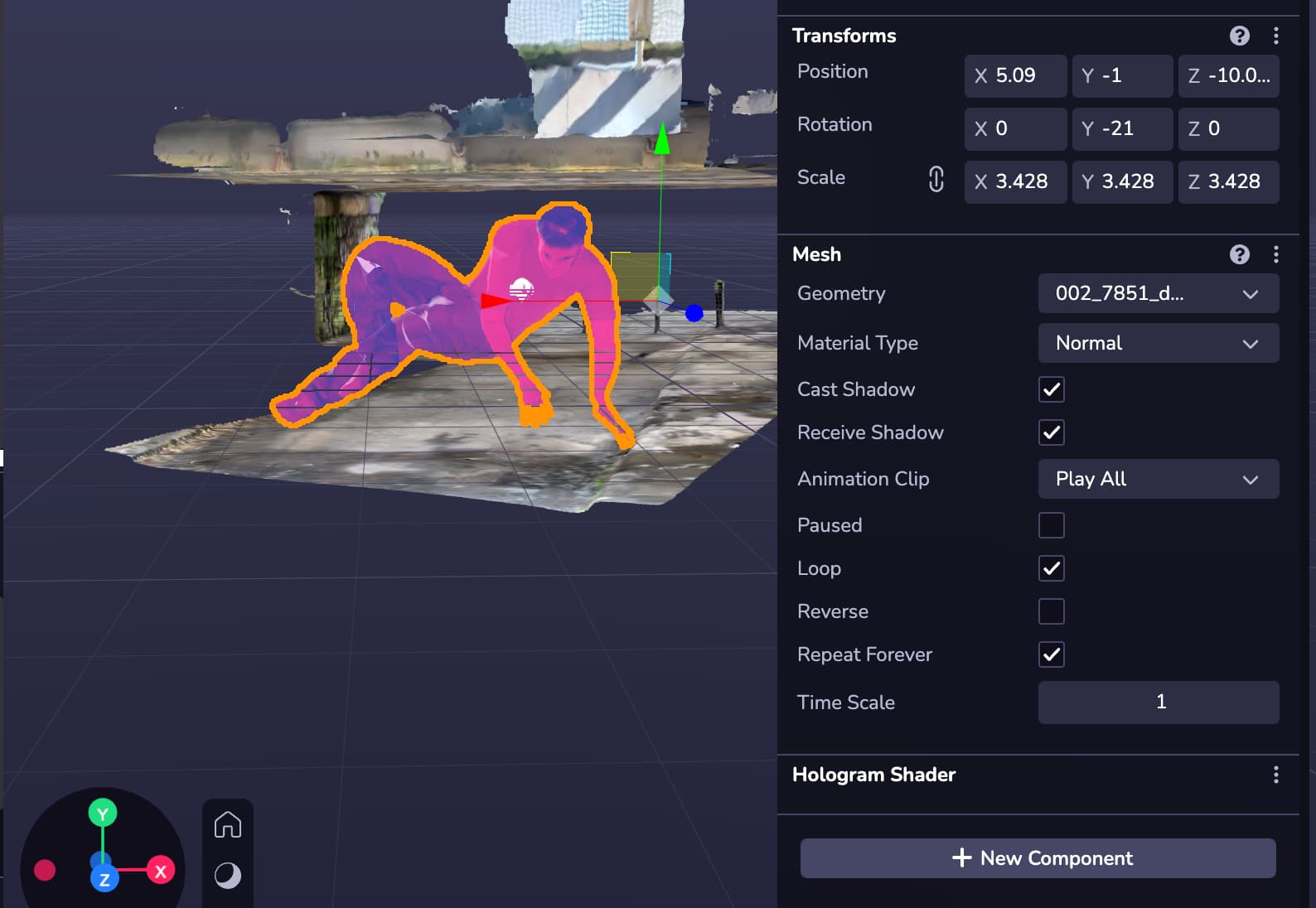
So I think the issue is that I cant seem to get my simulator to work. It just wont load. I have tried to restart my browser and computer several times and I am using chrome but no joy. I am right in thinking that the shader would only become clear in the simulator once it has been found while i am testing it?
That’s correct, the shader would only become visible once the component is mounted at runtime so you wouldn’t see it in action in the viewport.