Hi there.
I hope you are doing well.
My scenario is quite simple: for an annual event, I would like to augment outdoor places with content.
These places are an old fortress wall, located in surrounding garden that public can access to for free, and some are (wood sculpture among other things).
Some of theses places already exist as public location, yet I’ve scan them using scanniverse.
I understand that there is a validation process for such places but, according to the Geospatial Browser, none of them are under an activated status regarding the VPS.
Question is : I need to use theses real physical structures to project augmented content on/around them. What should I do next to:
-
add 3D content next to/on top of existing physical stuff (structure, statue, walls)
-
create an expérience in which users would walk the parc and activate AR content based on their proximity with theses augmented location (VPS + splat ?)
I have scanned by myself 5 differents places in the park (this morning). To use them, shall I keep scanning them until some approval is given, or is there a way to use them right now ?
Thank you for your time.
Hi!
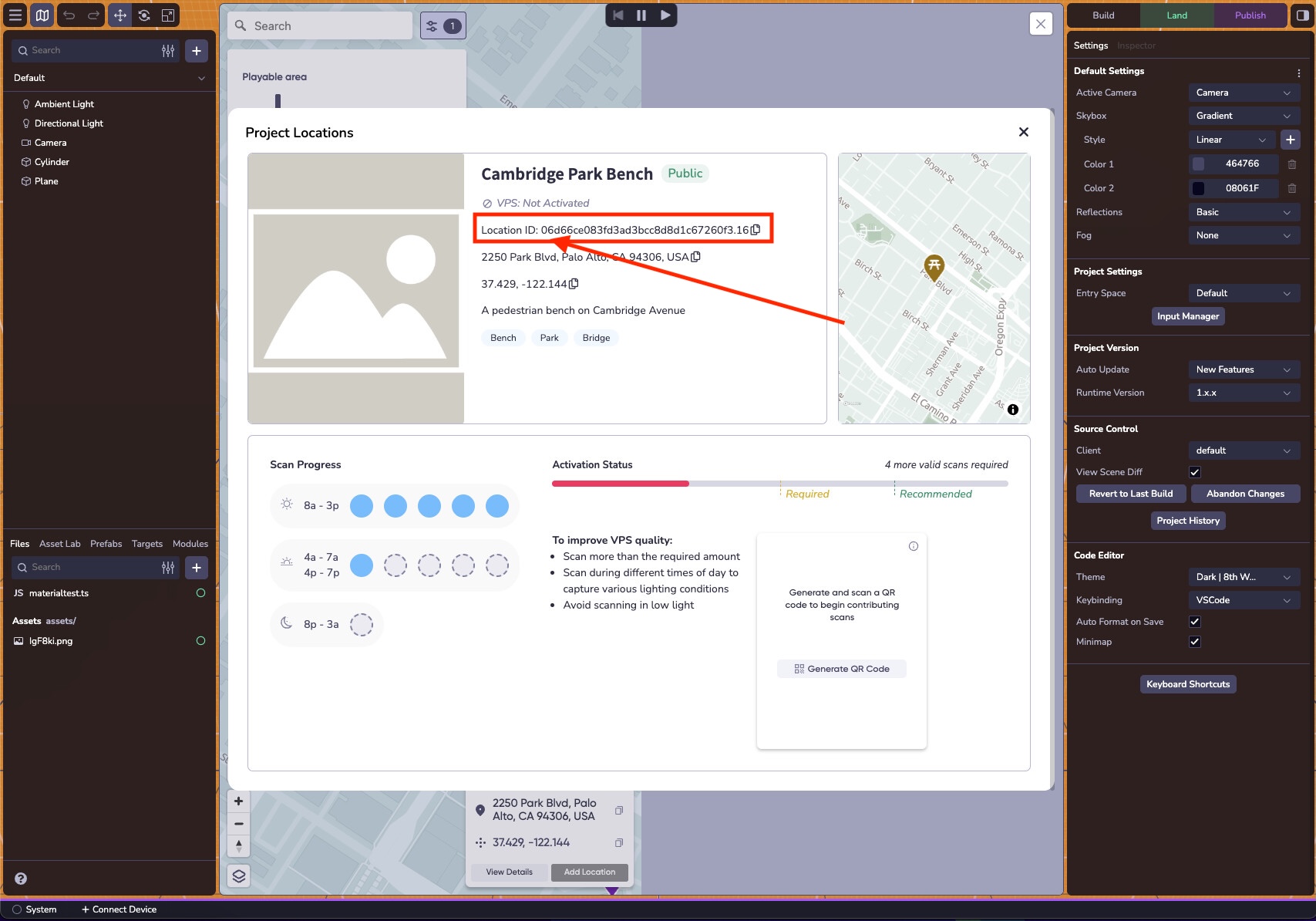
Are you seeing this page in the GSB for your location? It shows the time of day and amount of scans required to activate the location.
Hi!
Yes, I do see it.
But when I flash the QR code, I still can’t contribute to the scans : I’ve scan a place this morning that I had already scanned before but it as not contributed to the progress (it was 8 AM (GMT, Paris time).
Are scan “validated” in the moment or is there a delay for it ?
Also, do I have to wait between 2 scans or can I just scan the places every hours until requiered scans are meet, in the timespan of 8a-3p / 4a-7a/4p-7p/8p-3a (for that one well, I don’t live nearby and theses are not office hours lmao)
EDIT : it appear that I am connected as a developer …
You need to be within 50 meters of the location to add scans. Not all scans are required because once you’ve submitted enough scans at different times of day, the Activate button will become available. There is a short delay while the scans are processed, which typically takes a few hours. Lastly, your workspace name shows as “Lightship Developer,” but that is just the name of your workspace and does not affect your account permissions or access.
Alright, thank you for the details.
But, how do I add more scans ?
Because I’ve scanned several times, via the scanniverse app the same way I would have for a new place, but the scan counter did not change.
In the geospatial browser, when clicking on “begin scanning”, it start loading 8th Wall and then redirect to the root of the documentation.
The QR code to scan also simply launch scanniverse on my phone and that’s all. Not contribution whatsoever.
I must admit that I am a bit lost on that matter …
Could you send me the location ID so the mapping team can look into the issue?
Hi.
Here is the location ID : d6f4e7d3111b335f8e2152d26d49faa0.16
Is there a way to check that accounts are correctly linked together ? Because really, my scans of the QR codes do not contribute to the counter.
The thing is, I am going to need for a client project to scan and turn some already existing public places into VPS activated locations (maybe they were scanned several times already, but the counter did not incremented, not making them VPS active)
@GeorgeButler Hi ! Any news on that matter ?
The mapping team has looked into it and it looks like there were no scans uploaded or attempted for the Location ID: d6f4e7d3111b335f8e2152d26d49faa0.16.
It might be easier to see what’s going on if you can record yourself going through the process of adding a scan to this location.
That is really strange indeed cause I’ve already scanned it several times.
Following our discord talk about “test scan issue”, I’ve uninstalled and reinstalled the app to solve the issue (where both 8th wall and scanniverse account weren’t properly linked together). This morning (minutes ago), I’ve just scanned the place, processed and I was about to post it to map when it asked me to log in.
Once connected, I’ve posted the scan on the map.
I’ve then scanned the QR code from the desktop webpage of the GSB and it appear that I am not connected anymore, because the name of the workspace is now back to “lightship developer” (which is not the same as my 8th wall account).
Looking for a solution, I’ve then tried to scan the QR code of the test-scan we previously talked about and then, back to the correct workspace name.
And still no increment on the counter, yet.
I don’t understand how this all work TBH.
Here is the scanning process (excuse the quality, I’ve downgrade it because of the 10mb limit):
- Openning the scanninverse app
- using the + button to add a splat
- scanning the place
- processing the splat
- enhancing the processed splat
- posting it to the map (considering this is the way to increment the scan counter)
[EDIT] Both scan of the place now lives next to eachother so no increment in the scan obviously …
@GeorgeButler Hey !
I hope you are doing well.
Have you got any news on the matter ?
Hi, it seems like there might be some misunderstanding of how adding scans works.
- Start on 8th Wall
- Open your project and open the GSB
- Click the location you want to add scans for
- Scan the QR Code with your phone
- This opens the GSB on your phone in Scaniverse (If you see the Scaniverse map, something went wrong).
- Click on the Location you want to add Scans for
- Add scans
The tricky thing here is that there’s TWO maps in Scaniverse. The main Scaniverse map where you see Splats and then the GSB map which can be seen by clicking the paper map icon on the righthand side of the Scaniverse app.
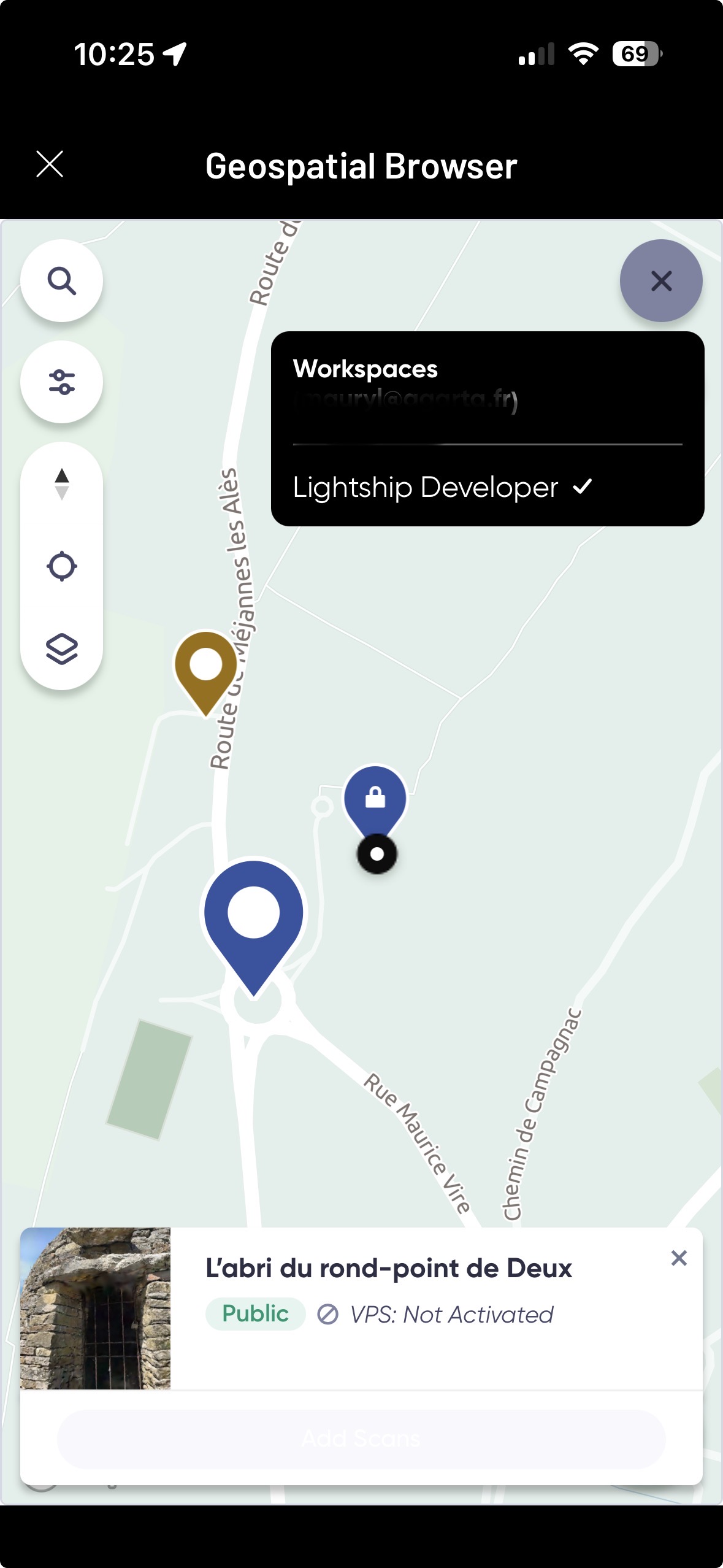
Alright so, I’ve followed the steps (the way I already did in previous attempts) and I’ve just realized that I had never paid attention to the button “add scan” … probably because it is currently greyed out and probably always has been.
My only guess on this matter is because of how far it is from my current location (120 to 130 meters away) when attempting to add scans .. I’ll go test this out and update my post accordingly …
@GeorgeButler
Well well well, it finally happened …
Now, 3 more questions before putting an end to that thread :
- can you confirm me that, once a place as been VPS activated, it will remain activated without the need for additionnal scans ?
- is there a way to “trick” the distance limitation (because I will have to scan places, for a client project, several times and theses places aren’t as close as the roundabout I’ve used for testing purpose) ?
- Finally I’ve understood that there is a time span to respect between each scan, meaning I can’t stay at a place for a full day, scanning every hours, right ?
Thank you for your help 
Yes, the location will remain activated. There isn’t any way to trick the distance limitation unfortunately, however I don’t think there is a time span restriction between scans so you could scan it all day as far as I know.
Ok, thank you for the precisions.
Well, I think this conclude the thread !